Showing posts with label learn test automation. Show all posts

Test automation - from theory to reality

If you have been reading about test automation in magazines, blogs or books, you get the idea that automation is nice, easy, straightforward and beautiful.

Because all these talk about theory, most of the time. 


Theory is always like a finished, simple, beautiful, well designed, professionally-done building. 


In theory, automation is about having 

  • independent tests
  • tests that create their own data and delete it after being executed 
  • dedicated test automation environment 
  • tests that run in parallel 
  • tests that use simulated external dependencies 
  • tests that run in 3 minutes  
  • good code written by professional people


This all sounds great and makes you want to get started with test automation tomorrow :) 


And how is test automation in reality? 

Have a look at this construction. 


Automation in real life means in many cases

  • dependent tests; if one test fails, multiple other tests fail 
  • tests that use manually created data; the data is also different from environment to environment; 
  • shared test automation environment; the tests are created and executed on an environment used as well for manual testing 
  • tests that run in "parallel"; instead of having tests executed in parallel on multiple Jenkins slaves, you have tests executed in "parallel" on the same slave 
  • tests that use real external dependencies 
  • tests that run in a few hours 
  • bad code written by non-professional people


Theory and reality are never similar. 

To get from reality to something similar to theory is difficult and takes a long time. 

But it is worth doing, that is for sure!

A day in the life of an automated tester

What does an automation engineer do?

What skills does he need?

How does a work day look like?

What problems does he face?

How are they solved?

What else except writing code is involved in test automation?

Are all automation jobs the same?


Test automation jobs are as diverse as the manual testing ones.

Many things can be different between 2 automation jobs:
  • application type: web site, mobile app, windows application or a console utility
  • programming language: automation is done mostly in Java and C# but also in Ruby, Python and JavaScript
  • automation library: open source (example: Selenium WebDriver, Appium, Robot Framework) or proprietary (UFT)
  • how the tests are designed: unit tests, behaviour integration tests, etc
  • project's design: page object model, page factory, keyword driven are just a few different models that can be used for automation


Test automation jobs can focus on different things.
Some create the automation project from scratch.
Others create tests for an existing framework or redesign existing automation frameworks.


Every job is about solving problems.

This series of articles aims to describe a day in the life of an automated tester, the problems that the tester has and their solutions.

Everything that follows is about a fictive job but inspired from reality.

Thanks for reading.


Day 4 - Page Object Model
Day 3 - About Automation Test Data
Day 2 - What Type Of Automation Job Is This?
Day 1 - First Day Of A New Job

The good, the bad and the ugly of test automation

Each manual tester that I know wants more excitement and challenge in his day-to-day work.

Because, lets admit it, manual testing gets boring at times.

So the testers look at the next best thing such as test automation.

They imagine a day when, having enough knowledge and skill, the manual testing will be traded with test automation.

Which will be exciting, challenging, interesting and never boring.

In other words, Good.

This is obviously not true all the time.

Test automation experiences can be good.

But also bad.

Or ugly.

Good, bad and ugly, 3 faces of test automation.


Have you seen this movie with Clint Eastwood?

The good, the bad and the ugly is one of the greatest films of all time.


It is about 3 gun fighters, the good, the bad and the ugly, all in search of a burried treasure.

Clint Eastwood as Blondie: The Good, a subdued, confident bounty hunter, capable of pity and providing comfort for dying soldiers,

Lee Van Cleef as Angel Eyes: The Bad, a ruthless, unfeeling, and sociopathic mercenary.

Eli Wallach as Tuco: The Ugly, a comical and oafish but cagey and resilient, fast-talking Mexican bandit who is wanted by the authorities for a long list of crimes.


Back to test automation.

How are automation projects good, bad or ugly?


The Good

You get hired to create test automation scripts for a web site.

The website already exists and it is stable.

There is no test automation in place.

Test data is easy to get and recreate.

The test environment is not shared with other test and development teams and can be easily refreshed.

It is your responsibility to create the test automation project from scratch including
  • the test scripts
  • the page objects
  • the test automation framework

You have the knowledge and the skills for the job.

You will not do all work by yourself but as part of a team that includes other people with similar knowledge, motivation and skills.


The Ugly

You start a new job and get handed an automation project created a few years ago.

Multiple teams worked on it during this time and created a few thousands of tests.

The tests run with a 30% fail/error rate.

The code has
  • tons of duplication
  • classes with thousands of lines of code
  • lots of static delays and implicit waits
  • it supports multiple applications (mobile site, desktop site)

The page object model is applied incorrectly with each page class having separate methods for clicking, typing, getting the value of each element.

The test environment is shared with other manual test teams.

The test data is very difficult to configure and recreate.

It is your responsibility to clean the project up, to stabilize it by reducing the fail/error rate and to bring the project in shape.


The Bad

This is when you get hired for a test automation job and you are not ready for it.

Your skills are incomplete and your experience limited.

There are high expectations from you and you cannot deliver.

Not without significant time dedicated to training.


3 faces of the same experience.

The good, the bad and the ugly of test automation.

Learn automation while you don't need it

I have been a software manual tester for 10 years.

Due to the regression tests that I do every other week, it is imperative that I get this function automated to help me with the rest of my job.

I regression test over 90 custom sites for my company and really need to get this done by February 2017.

Please help.

I received this message from a tester a few weeks ago.

He wanted to learn automation and programming and use these skills successfully in 2 months.

Which is very difficult to do.

I don't know why he did not start learning earlier.

He probably thought that will not need automation and his employer will hire a developer for the automation work.

So he did what many people do in similar occasions: postpone.

We don't like change and avoid it.

Our hope is that somehow things stay the same or we figure them out.

And a moment comes when we need change fast and results too.

This is when we realize the mistake of not starting ahead of time, when we don't need the new skills yet.

Fast change happens in stories and movies only.

Real change takes time and is done in small steps.

So, stop postponing learning programming and get started.

It does not matter if you need it in your job now or not.

You will need it sooner than you think.

Next December, you will be very happy that you started learning automation the year before.

9 Easy TestNG Features You Can Learn Today That Will Improve Your Test Automation


The TestNG unit testing framework has many easy-to-implement features that will make you test automation easier:
  1. Dependent scripts
  2. Soft assertions
  3. Skipped tests
  4. Execute tests multiple times
  5. Before/After Method, Class, Test, Group, Suite
  6. Tests with parameters
  7. Run tests in parallel
  8. Reports
  9. Run failed tests
Most of these features do not exist in JUNIT.


INSTALL TEST NG


First, lets see how Test NG can be installed:

  • In Eclipse, open Eclipse Marketplace (Help menu --> Eclipse MarketPlace)


  • Select the Popular tab in the Eclipse MarketPlace window
  • Find the Test NG for Eclipse Plugin
  • Install it


  • Add Test NG to the project:
    • Right click on the project name and select Properties


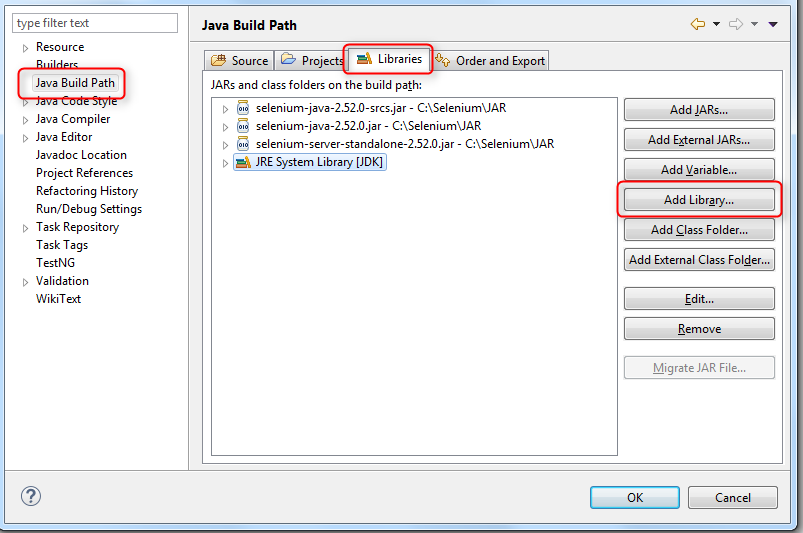
    • In the Properties page, select the Java Build Path tab, select Libraries and click the Add Library button


    • Select Test NG and click Finish


It is a good practice to have only independent test scripts when working on test automation.

In some cases, however, it is useful to have the ability of making test scripts dependent of other scripts.

For example, let's assume that we have a number of test scripts that all depend on a database being available.

If the database is not available, all test scripts fail.

To avoid having all test scripts failing, we could create a test script that checks the database status.

Then, we can make all other test scripts depend on the "check database status" script.

The result will be that, if the database is not available, the other test scripts will not fail but be ignored.


It is not possible to have dependent scripts in JUNIT.


Test NG allows creating dependent tests using methods and groups.


TEST SCRIPTS THAT DEPEND ON METHODS

package tests;

import static org.testng.AssertJUnit.assertTrue;
import org.testng.annotations.Test;

public class OrderedCheckOutTests {

@Test (dependsOnMethods = "addProductToCart")
public void checkOutAndPay()
{

System.out.println("3. checkOutAndPay Completed ");  

}

@Test (dependsOnMethods = "searchForProduct")
public void addProductToCart()
{

System.out.println("2. addProductToCart Completed");

}

@Test
public void searchForProduct()
{

System.out.println("1. searchForProduct Completed");

assertTrue(false);

}

}

When executing the test class, the test scripts run in the following order:
  1. searchForProduct()
  2. addProductToCart() (depends on searchForProduct so searchForProduct runs first)
  3. checkOutAndPay() (depends on addProductToCart so addProductToCart runs first)


TEST SCRIPTS THAT DEPEND ON GROUPS

package tests;

import org.testng.annotations.Test;

public class OrderedCheckOutTests2 {

@Test (dependsOnGroups = "search")
public void checkOutAndPay()
{

System.out.println("3. checkOutAndPay Completed ");  

}

@Test (groups = "search")
public void addProductToCart()
{

System.out.println("2. addProductToCart Completed");

}

@Test (groups = "search")
public void searchForProduct()
{

System.out.println("1. searchForProduct Completed");  

}

}


When executing the test class, the test scripts run in the following order:
  1. searchForProduct()
  2. addProductToCart() (the first 2 scripts can run in any order)
  3. checkOutAndPay() (depends on searchForProduct and addProductToCart so these 2 scripts run first)


An example will help explaining how soft assertions work.

We are working on automating testing for a user registration page.


There are multiple fields in the page for username, password, first name, last name, email, etc.

The test script checks if each field value is valid so it has an assertion for each field.

If multiple fields have invalid values, the assertion for the first invalid field fails and the remaining assertions are ignored.

It would be nice if we would have the ability to run assertions for all fields and then 
  • fail the script if at least one assertion fails
  • pass the script if all assertions pass
This is what soft assertions do:


package tests;

import static org.testng.AssertJUnit.assertTrue;
import org.testng.annotations.Test;
import org.testng.asserts.SoftAssert;

public class SoftAssertions {

SoftAssert softAssertion = new SoftAssert();

@Test
public void testHardAssert1()
{

assertTrue(false);

} 

@Test
public void testHardAssert2()
{

assertTrue(false);

assertTrue(false);

assertTrue(true);

}

@Test 
public void testSoftAssert2()
{

softAssertion.assertTrue(false);

softAssertion.assertEquals(1, 2);

softAssertion.assertEquals(true, false);

softAssertion.assertAll();

}

} 


When running the test class, we get the following results:
  1. testHardAssert1() fails
  2. testHardAssert2() fails (only the first assertion is executed)
  3. testSoftAssert2() fails (all 3 assertions are executed)


Soft assertions work as containers for normal assertions.

If any of the child assertions fails, the soft assertion fails after all child assertions run.

If all child assertions pass, the soft assertion passes as well.


Lets go back to the example where multiple test scripts depend on a database being available.

Lets assume that each test script checks first if the database is available.

If the database is not available, it would be nice to flag the tests as skipped instead of failed.

The SkipException from Test NG can be used for skipping tests:


package tests;

import org.testng.SkipException;
import org.testng.annotations.Test;

public class SkippedTests {

@Test
public void checkOutAndPay()
{

System.out.println("3. checkOutAndPay Completed ");

}

@Test
public void addProductToCart()
{

System.out.println("2. addProductToCart Completed");

throw new SkipException("Skipping this exception");

}

@Test
public void searchForProduct()
{

System.out.println("1. searchForProduct Completed"); 

if (1 != 2)
throw new SkipException("Skipping this exception");

}

}


If a test script needs to be executed multiple times, the @Test (invocationCount = 10) annotation can be used as shown in the example below.


package tests;

import org.testng.annotations.Test;

@Test (groups = "regression")
public class TestsExecutedMultipleTimes {

@Test (invocationCount = 10)
public void test1()
{

}

@Test
public void test2()
{

}

}


In Test NG, the following components are being used:
  • Method
  • Suite: made of one or more tests
  • Test: made of one or more classes
  • Class: made of one or more methods
  • Group: made of one or more methods of different classes

Test NG has Before and After annotations for all these components (compared with JUNIT which has them only for methods, classes and suites):
  • @BeforeSuite / @AfterSuite — before a suite starts / after all the test methods in a certain suite have been run
  • @BeforeTest / @AfterTest — before a test starts / after all the test methods in a certain test have been run (remember that a test is made of
  • @BeforeClass / @AfterClass — before a test class starts / after all the test methods in a certain class have been run
  • @BeforeMethod / @AfterMethod — before a test method is run / after a test method has been run
  • @BeforeGroups / @AfterGroups — before any test method in a given group is run / after all the test methods in a given group have been run


Tests with parameters exist in JUNIT as well.

Test NG adds more functionality for them.

The parameter values can come from
  • the Test NG XML file
    • the test script uses  @Parameters ({ "parameter1", "parameter2"}) for specifying the parameter names
  • multiple data providers; this is an improvement compared to JUNIT where only 1 provider is possible
    • the test script uses @Test(dataProvider = "provider1") for specifying the data provider that it needs
    • the test script can have parameters like any other method (not possible in JUNIT)


TEST NG XML FILE


<suite name="Suite1" verbose="1" >
<parameter name="parameter1" value="value 1" />
<parameter name="parameter2" value="value 2" />
</suite>


package tests;

import org.testng.annotations.DataProvider;
import org.testng.annotations.Parameters;
import org.testng.annotations.Test;

public class TestsWithParameters {

@DataProvider(name = "provider1")
public Object[][] provider1() {

return new Object[][] {
{ "provider1_aaa", "provider1_bbb" },
{ "provider1_ccc", "provider1_ddd" },
{ "provider1_eee", "provider1_fff" },
{ "provider1_ggg", "provider1_hhh"},
{ "provider1_iii", "provider1_jjj" },

};

}

@DataProvider(name = "provider2")
public Object[][] provider2() {

return new Object[][] {
{ "provider2_aaa", "provider2_bbb" },
{ "provider2_ccc", "provider2_ddd" },
{ "provider2_eee", "provider2_fff" },
{ "provider2_ggg", "provider2_hhh"},
{ "provider2_iii", "provider2_jjj" },

};

}

@Parameters ({ "parameter1", "parameter2"})
@Test
public void displayParameterValuesFromFile(String p1, String p2) {

System.out.println(p1 + " , " + p2);

}

@Test(dataProvider = "provider1")
public void displayParameterValuesFromDataProvider1(String p1, String p2) {

System.out.println(p1 + " , " + p2);

}

@Test(dataProvider = "provider2")
public void displayParameterValuesFromDataProvider2(String p1, String p2) {

System.out.println(p1 + " , " + p2);

}

}


When time is an issue and the execution of the test suite is slow, running test scripts in parallel will help.

Running test scripts in parallel in Test NG is simpler than doing it in JUNIT.

And it does not require using Maven or Maven SureFire.

You just need to specify values for the invocation count and the threadPoolSize parameters.


package tests;

import static org.testng.AssertJUnit.assertTrue;
import org.testng.annotations.Test;

public class ParallelTests {

@Test(invocationCount = 5, threadPoolSize = 10)
public void test1()
{

assertTrue (true);

}

@Test(invocationCount = 5, threadPoolSize = 10)
public void test2()
{

assertTrue (true);

}

@Test(invocationCount = 5, threadPoolSize = 10)
public void test3()
{

assertTrue (true);

}

@Test(invocationCount = 5, threadPoolSize = 10)
public void test4()
{

assertTrue (true);

}

@Test(invocationCount = 5, threadPoolSize = 10)
public void test5()
{

assertTrue (true);

}

}


Test NG allows running the failed test scripts without making any changes to the test annotations.

This is so much easier than in JUNIT where you need to ignore the passing tests to be able to run the failed ones.

An example will make this clear.

Lets start with a simple class with 6 test scripts.


import static org.testng.AssertJUnit.assertTrue;

import org.testng.Assert;
import org.testng.annotations.Test;
public class class1 {
 
@Test
public void test1()
{
Assert.assertTrue(true);
}

@Test
public void test2()
{
Assert.assertTrue(true);
}

@Test
public void test3()
{
Assert.assertTrue(true);
}

@Test
public void test4()
{
Assert.assertTrue(true);
}

@Test
public void test5()
{
Assert.assertTrue(true);
}

@Test
public void test6()
{
Assert.assertTrue(true);
}

}


Running the class makes all test scripts pass:

[TestNG] Running: C:\Users\home\AppData\Local\Temp\testng-eclipse--1476802653\testng-customsuite.xml

PASSED: test1
PASSED: test2
PASSED: test3
PASSED: test4
PASSED: test5
PASSED: test6

==============================================

Default test Tests run: 6, Failures: 0, Skips: 0 ==============================================

Default suite Total tests run: 6, Failures: 0, Skips: 0

==============================================


Lets make 2 of the test scripts fail (test2 and test4).


import static org.testng.AssertJUnit.assertTrue;

import org.testng.Assert;
import org.testng.annotations.Test;
public class class1 {
 
@Test
public void test1()
{
Assert.assertTrue(true);
}

@Test
public void test2()
{
Assert.assertTrue(false);
}

@Test
public void test3()
{
Assert.assertTrue(true);
}

@Test
public void test4()
{
Assert.assertTrue(false);
}

@Test
public void test5()
{
Assert.assertTrue(true);
}

@Test
public void test6()
{
Assert.assertTrue(true);
}

}


Re-running the class shows 2 test scripts failing:

=============================================== 

 Default test Tests run: 6, Failures: 2, Skips: 0 

=============================================== 

Default suite Total tests run: 6, Failures: 2, Skips: 0 

===============================================

To re-run only the failed scripts, we need to

  • fix the errors from the failed tests
  • select the Results Of Running Suite Tab


  • click the Run Failed Test Button


The failed tests only are being re-executed.


JUNIT does not have any default reporting functionality.

Reports can be generated in different ways


Test NG has a simple report built in.

To see it, follow the next steps:

  • click the Results Of Running Suite Tab
  • click the Open Test NG Report button


The report is displayed in a new tab of the Eclipse editor.

Customized information can be added to the Reporter Output section using the Reporter.log(text) method:


Is it easy to learn Selenium WebDriver if I dont know Java?


Learning Selenium WebDriver and Java is rarely as easy as people says that it is.

It is not easy.

It is not difficult.

It is challenging.

If test automation is easy, all testers would know it.

And this article would not exist.

Before we continue, think about how many testers you know who had success learning Selenium by themselves without knowing Java first.

Do you know many?


What is test automation about?


Test automation is about
  1. Creating Test Scripts using

  2. A Programming Language Like Java for

  3. Automating User Scenarios by

  4. Interacting With The Application through

  5. A Test Automation Library Like Selenium WebDriver

The programming language is the most difficult to learn.

Programming languages come from math and include lots of abstractions that are not always intuitive.


What else is involved in test automation?


Test automation with Selenium WebDriver means more than programming with Java.

Test automation requires also
  1. Unit testing framework

  2. The test automation scripts need to be short and independent.

    This is achieved through unit testing frameworks such as JUNIT or TEST NG.

    Key unit testing concepts for test automation are
    • annotations
    • test runner
    • assertions
    • test suites
    • test fixtures

  3. Locators of site elements

  4. Each test automation script interacts with various site elements by
    • clicking them
    • typing text in them
    • getting element status (is displayed, is selected, is enabled)
    • getting element information (value, attributes values, css info)

    Before interacting with a site element, this element has to be found.

    If the element has an id or name, finding it is very easy.

    Otherwise, an expression called element locator has to be created using languages such as CSS and XPATH.

  5. Organize the code with object oriented programming

  6. It is not sufficient to create test automation scripts that work.

    The test scripts should also be clear, easy to change and maintain.

    This is accomplished through models such as Page Objects which require knowledge of object oriented concepts like classes and inheritance.

  7. Use external frameworks

  8. When working on test automation scripts, it is important to think also about reporting, taking screenshots, running scripts in parallel, logging.

    Many of these functionalities are provided by 3rd party libraries.


How challenging is to learn Selenium?


How you learn Selenium determines how big the challenge is.

Learning by yourself makes it very challenging.

It is free as it does not cost any money.

It will cost you, however, lots of time, frustration and effort.

The chances of not succeeding are high.

If you have time to spare, learning by yourself may be an option.

But it is not the best option if you need results fast.

When learning by yourself, there are multiple challenges that you need to manage.


There is a huge amount of Selenium and Java study materials available for beginners.

Blogs, books, online courses.

Some of them are good and adequate for a beginner, others are not.

The challenge is selecting the good ones.

Also, after a while, your level of knowledge changes from beginner to intermediate.

For testers with intermediate level for Selenium and Java, there are less study materials available.

The same challenge remains but it becomes more evident.

How will you find study materials that take you forward instead of being just confusing?


Test automation requires multiple skills as explained above.

The order that these skills are learned is important.

In other words, what will you learn first?

The programming language?

XPATH?

Browser concepts?

Unit testing?

Page object model?

CSS?

The same question applies to learning each individual skill.

Where will you start, what will be the next step, and the step after, etc?


Without a clear learning map and a good compass to navigate it, learning Selenium may be very challenging.


Each skill required for test automation is vast.

Learning it fully takes a very long time and is usually not necessary for working on test automation.

The challenge is to know how much of each skill is needed for starting test automation in the shortest time possible.


One thing happens for sure when learning test automation.

You run into issues and problems about a specific element or about how different elements work together.

And you dont know how to solve the issue and have no idea how to find information or help.

Without a support system that helps you in difficult situations, your learning may be stuck or stopped.


Everyone has expectations before starting learning.

Incorrect expectations are that learning will be easy and fast and that there is a limited number of things to learn.

There are always more things to learn than you expected.

And no, learning will not be easy and will not be fast.

The opposite is true.

How you define your goals increases or decreases the chance of failing.

A goal like "I will become a test automation expert in 3 months" is unrealistic.

A much better goal is "In 3 months, I will be able to create simple test automation scripts for the www.abc.com site".

Starting small and learning continuously new skills increase the chances to success.

Learning Selenium takes time.

It will not happen in a week or a month.

Each individual skill needs to be learned separately.

Then, you should learn how to use them together.

In time, without focus and perseverance, boredom or frustration can happen which may bring your learning to a halt.


I want to be clear.

It is not impossible to learn Selenium and Java by yourself.

It can be done.

But there are better and easier ways of doing it than by yourself.

Is there a less challenging way of learning Selenium?


Learning Selenium does not have to be this challenging.

Being trained by someone else is easier, less challenging and gets started in a relative short time.

It is not free but it saves lots of time and lots of effort.

This is because the trainer

  • has the resources that you need

  • has past experience training people like you

  • has the answers for your questions

  • knows the easiest and shortest way to take to your goal

  • has the map of how your learning should happen

  • he is there for you when you need help

  • he keeps you focused


The decision about how to learn is yours.

What will you do?

Why is unit testing essential for test automation?


Using unit tests in a test automation project brings a lot of benefits

  1. create short test automation scripts
  2. have independent test automation scripts
  3. have easy to maintain code


What follows is a very long article about why unit testing is essential for test automation.

It includes real code that you can use by yourself.

If you have any questions on the code or the article, please leave them in the Comments section.

Enjoy!


TEST AUTOMATION WITHOUT UNIT TESTS


Lets start with a sample project that aims at automating 2 test cases.

Both test cases describe user scenarios for the Vancouver Public Library site:


Test Case 1

1. open the home page of the site (http://www.vpl.ca)

2. Check that the home page title is correct

3. Do a keyword search; the results page opens after the keyword search


4. Check that the results page title is correct

5. Click on the first result of the results page; the details page opens


6. On the details page, check that the book title is displayed and not empty

7. On the details page, check that the book author is displayed and not empty


Test Case 2

1. open the home page of the site (http://www.vpl.ca)

2. Check that the home page title is correct

3. Do a keyword search; the results page opens after the keyword search

4. Check that the results page title is correct

5. Check that the results count is displayed and is correct for page 1

6. click on page 2 of results


7. Check that the results count is displayed and is correct for page 2


See below the code of the project.

It uses Java as the programming language.


//TEST CASE 1: book title and author are displayed and not empty


import org.openqa.selenium.By;
import org.openqa.selenium.WebDriver;
import org.openqa.selenium.WebElement;
import org.openqa.selenium.firefox.FirefoxDriver;

public class LibraryTestCases {

public static void main(String[] args) {

WebDriver driver = new FirefoxDriver();

//open the home page and check that the home page title is correct
driver.get("http://www.vpl.ca");

if (driver.getTitle().equalsIgnoreCase("Vancouver Public Library - Home") == true)
 System.out.println("correct home page title");
else
{
 System.out.println("incorrect home page title, stop application");
 System.exit(0);
}

//search with a keyword, the results page is opened as result of the search
WebElement searchTextBox;
searchTextBox = driver.findElement(By.xpath("//input[@id='globalQuery']"));

searchTextBox.click();
searchTextBox.sendKeys("java");

WebElement searchButton;
searchButton = driver.findElement(By.xpath("//input[@class='search_button']"));
searchButton.click();

//check that the results page title is correct  
if (driver.getTitle().equalsIgnoreCase("Search | Vancouver Public Library | BiblioCommons") == true)
 System.out.println("correct results page title");
else
{
 System.out.println("incorrect results page title, stop application");
 System.exit(0);
}

//click on the first result, the details page is opened as a result
WebElement firstResult;
firstResult = driver.findElement(By.xpath("(//a[@testid='bib_link'])[1]"));  
firstResult.click();

//check that the title of details page is correct
if (driver.getTitle().indexOf("Vancouver Public Library | BiblioCommons") >= 0)
 System.out.println("correct details page title");
else
{
 System.out.println("incorrect details page title, stop the application");
 System.exit(0);
}
    
//check that the book title is displayed and not empty
WebElement bookTitle = driver.findElement(By.xpath("//h1[@id='item_bib_title']"));

if (bookTitle.isDisplayed() == true)
 System.out.println("book title displayed");
else
{
 System.out.println("book title not displayed, stop application");
 System.exit(0);
}

if (bookTitle.getText().length() > 0)
 System.out.println("the book title not empty");
else
{
 System.out.println("book title empty, stop application");
 System.exit(0);
}


//check that the book author is displayed and not empty
WebElement bookAuthor;
bookAuthor = driver.findElement(By.xpath("//a[@testid='author_search']"));

if (bookAuthor.isDisplayed() == true)
 System.out.println("book author displayed");
else
{
 System.out.println("book author not displayed, stop application");
 System.exit(0);
}

if (bookAuthor.getText().length() > 0)
 System.out.println("book author not empty");
else
{
 System.out.println("book author empty, stop application");
 System.exit(0);
}


//TEST CASE 2: browsing through results pages works


//go back to results page
driver.navigate().back();


//check that the number of results is displayed and correct
WebElement numberResultPageOne;
numberResultPageOne = driver.findElement(By.xpath("//span[@class='items_showing_count']"));

if (numberResultPageOne.isDisplayed() == true)
 System.out.println("Results number on page 1 - displayed");
else
{
 System.out.println("Results number on page 1 - not displayed, stop app");
 System.exit(0);
}

if (numberResultPageOne.getText().indexOf("1 - 25") >=0)
 System.out.println("Results number on page 1 - correct");
else
{
 System.out.println("Results number on page 1 - not correct, stop app");
 System.exit(0);
}


//navigating to page 2 of results
WebElement pageTwo = driver.findElement(By.xpath("//a[@testid='link_page2']"));
pageTwo.click();


//check that the number of results is displayed and correct
WebElement numberResultPageTwo;
numberResultPageTwo  = driver.findElement(By.xpath("//span[@class='items_showing_count']"));

if (numberResultPageTwo.isDisplayed() == true)
 System.out.println("Results number on page 2 - displayed");
else
{
 System.out.println("Results number on page 2 - not displayed, stop app");
 System.exit(0);
}

if (numberResultPageTwo.getText().indexOf("26 - 50") >=0)
 System.out.println("Results number on page 2 - correct");
else
{
 System.out.println("Results number on page 2 - not correct, stop app");
 System.exit(0);
}

//close the browser
driver.quit();


}

}


The code goes through the following phases:

1. create the browser driver object; the Firefox browser is loaded as a result

2. Test Case 1 code; it goes from home page to results page and from the results page to details page

3. go back from details page to results page; this is needed because test case 2 happens on results page

going back from details page to results page is done to avoid going through the home page for test case 2

4. Test Case 2 code

5. quit the browser driver object; the Firefox browser is closed as a result


Each test case has a few verifications.

Each verification logs information to the console panel.

If the verification passes, the code execution continues.

If the verification fails, the application is stopped.


WHAT IS WRONG WITH THIS SAMPLE PROJECT?


The sample code is not efficient for multiple reasons:

1. if one of the test case 1 verifications fails, the application stops; test case 2 is completely ignored

2. to understand if the test cases passed or failed, the test automation engineer needs to read all information from the console panel

3. the code is long; its maintenance will not be easy

How do we fix these issues?


UNIT TESTING TO THE RESCUE

First, some unit testing basics.

We will continue with a code example shortly.
  • Unit testing is being done with the help of unit testing frameworks.
  • With a unit testing framework, developers create short unit test scripts that test their application code.
  • The unit tests are code that tests the application code.
  • Each unit test has the purpose of testing a single application entity (one class, one object).
  • Each of the unit tests is independent of the other unit tests.
  • Unit tests are being created in test classes.
  • They can be identified from normal class methods through annotations.
  • A unit test verifies if the tested entity works as expected. This is done using assertions.
  • Developer can create multiple unit tests for his application code. Test runners are used for running both individual and multiple unit tests.
  • Before executing unit tests, the environment may need to be set up. The environment should be cleaned up after the unit test executes. 
  • The set up and cleaning of the environment is being done through test fixtures.


TEST AUTOMATION WITH UNIT TESTS


I will refactor the sample project in a few different steps:
  1. break the code in unit tests
  2. use assertions for test case verifications
  3. use test fixtures for setting up and cleaning the test environment
The JUNIT framework will be used in the code examples.


The code can be changed easily to use the Test NG framework.


1. BREAK THE CODE IN UNIT TEST SCRIPT


Lets see how the code can be broken down.

I will use a test class that does not have a main method and includes 2 unit test scripts (one for each test case).

Each unit test is prefixed with the @Test annotation.


import org.openqa.selenium.By;
import org.openqa.selenium.WebDriver;
import org.openqa.selenium.WebElement;
import org.openqa.selenium.firefox.FirefoxDriver;

public class LibraryTestCases {


//Test Case 1: book title and author are displayed and not empty


@Test
public void testResultDetails()
{

WebDriver driver = new FirefoxDriver();

//open the home page and check that the home page title is correct
driver.get("http://www.vpl.ca");

if (driver.getTitle().equalsIgnoreCase("Vancouver Public Library - Home") == true)
 System.out.println("the home page title is correct");
else
{
 System.out.println("the home page title is incorrect, stop the application");
 System.exit(0);
}

//search with a keyword, the results page is opened as result of the search
WebElement searchTextBox = driver.findElement(By.xpath("//input[@id='globalQuery']"));
searchTextBox.click();
searchTextBox.sendKeys("java");

WebElement searchButton = driver.findElement(By.xpath("//input[@class='search_button']"));
searchButton.click();

//check that the results page title is correct  
if (driver.getTitle().equalsIgnoreCase("Search | Vancouver Public Library | BiblioCommons") == true)
 System.out.println("the results page title is correct");
else
{
 System.out.println("the results page title is incorrect, stop the application");
 System.exit(0);
}

//click on the first result, the details page is opened as a result
WebElement firstResult = driver.findElement(By.xpath("(//a[@testid='bib_link'])[1]"));  
firstResult.click();

//check that the title of details page is correct
if (driver.getTitle().indexOf("Vancouver Public Library | BiblioCommons") >= 0)
 System.out.println("the details page title is correct");
else
{
 System.out.println("the details page title is incorrect, stop the application");
 System.exit(0);
}

//check that the book title is displayed and not empty
WebElement bookTitle = driver.findElement(By.xpath("//h1[@id='item_bib_title']"));

if (bookTitle.isDisplayed() == true)
 System.out.println("the book title is displayed");
else
{
 System.out.println("the book title is not displayed, stop the application");
 System.exit(0);
}

if (bookTitle.getText().length() > 0)
 System.out.println("the book title is not empty");
else
{
 System.out.println("the book title is empty, stop the application");
 System.exit(0);
}

//check that the book author is displayed and not empty
WebElement bookAuthor = driver.findElement(By.xpath("//a[@testid='author_search']"));

if (bookAuthor.isDisplayed() == true)
 System.out.println("the book author is displayed");
else
{
 System.out.println("the book author is not displayed, stop the application");
 System.exit(0);
}

if (bookAuthor.getText().length() > 0)
 System.out.println("the book author is not empty");
else
{
 System.out.println("the book author is empty, stop the application");
 System.exit(0);
}

//close the browser
driver.quit();

} 

//Test Case 2: browsing through results page works


@Test 
public void testPaging()
{

WebDriver driver = new FirefoxDriver();

//open the home page and check that the home page title is correct
driver.get("http://www.vpl.ca");

if (driver.getTitle().equalsIgnoreCase("Vancouver Public Library - Home") == true)
 System.out.println("the home page title is correct");
else
{
 System.out.println("the home page title is incorrect, stop the application");
 System.exit(0);
}

//search with a keyword, the results page is opened as result of the search
WebElement searchTextBox = driver.findElement(By.xpath("//input[@id='globalQuery']"));
searchTextBox.click();
searchTextBox.sendKeys("java");

WebElement searchButton = driver.findElement(By.xpath("//input[@class='search_button']"));
searchButton.click();

//check that the results page title is correct  
if (driver.getTitle().equalsIgnoreCase("Search | Vancouver Public Library | BiblioCommons") == true)
 System.out.println("the results page title is correct");
else
{
 System.out.println("the results page title is incorrect, stop the application");
 System.exit(0);
}

//check that the number of results is displayed and correct
WebElement numberResultPageOne = driver.findElement(By.xpath("//span[@class='items_showing_count']"));

if (numberResultPageOne.isDisplayed() == true)
 System.out.println("The number of the results on the page 1 is displayed");
else
{
 System.out.println("The number of the results on the page 1 is not displayed, stop the application");
 System.exit(0);
}

if (numberResultPageOne.getText().indexOf("1 - 25") >=0)
 System.out.println("The number of the results on the page 1 is correct");
else
{
 System.out.println("The number of the results on the page 1 is not correct, stop the application");
 System.exit(0);
}

//navigating to page 2 of results
WebElement pageTwo = driver.findElement(By.xpath("//a[@testid='link_page2']"));
pageTwo.click();

//check that the number of results is displayed and correct
WebElement numberResultPageTwo = driver.findElement(By.xpath("//span[@class='items_showing_count']"));

if (numberResultPageTwo.isDisplayed() == true)
 System.out.println("The number of the results on the page 2 is displayed");
else
{
 System.out.println("The number of the results on the page 2 is not displayed, stop the application");
 System.exit(0);
}

if (numberResultPageTwo.getText().indexOf("26 - 50") >=0)
 System.out.println("The number of the results on the page 2 is correct");
else
{
 System.out.println("The number of the results on the page 2 is not correct, stop the application");
 System.exit(0);
}

//close the browser
driver.quit();

}

}

The changes done so far are that

  • the test class does not have a main method any longer
  • the code of each test case is included in a separate unit test; each unit test uses the @Test annotations
  • executing the test class will execute both unit tests; if one of the unit tests fails, the second unit test continues
  • both unit tests have a similar structure:
    • create the Selenium WebDriver browser driver object
    • open the site
    • implement the test case
    • quit the browser driver object

It is because of this structure that both unit tests are independent.

The result of executing the unit tests is a green bar.

The unit tests are still logging information to the console panel about their verifications.

Executing the scripts shows a green execution bar meaning that all unit tests passed:


The green bar is displayed even if one of the unit tests has an error.

We need to use assertions so that the bar is red in case of an error.


2. USE ASSERTIONS FOR TEST CASE VERIFICATIONS

All verifications will be replaced next with assertions.

Assertions get a condition that needs to be verified.

The condition is evaluated.

If the condition's result is true, the assertion passes and the unit test continues.

If the condition fails, the assertion fails and the unit test fails as well.


Assertions do not log any information to the console.

An error message can be logged to the Failure panel.

The error message is optional.

import org.openqa.selenium.By;
import org.openqa.selenium.WebDriver;
import org.openqa.selenium.WebElement;
import org.openqa.selenium.firefox.FirefoxDriver;

public class LibraryTestCases {

//Test Case 1: book title and author are displayed and not empty

@Test
public void testResultDetails()
{

WebDriver driver = new FirefoxDriver();

//open the home page and check that the home page title is correct
driver.get("http://www.vpl.ca");

assertTrue("incorrect home page title", 
driver.getTitle().equalsIgnoreCase("Vancouver Public Library - Home") == true);

//search with a keyword, the results page is opened as result of the search
WebElement searchTextBox = driver.findElement(By.xpath("//input[@id='globalQuery']"));
searchTextBox.click();
searchTextBox.sendKeys("java");

WebElement searchButton = driver.findElement(By.xpath("//input[@class='search_button']"));
searchButton.click();

//check that the results page title is correct  
assertTrue("results page title incorrect", 
driver.getTitle().equalsIgnoreCase("Search | Vancouver Public Library | BiblioCommons") == true);

//click on the first result, the details page is opened as a result
WebElement firstResult = driver.findElement(By.xpath("(//a[@testid='bib_link'])[1]")); 
firstResult.click();

//check that the title of details page is correct
assertTrue ("the details page title is incorrect", 
driver.getTitle().indexOf("Vancouver Public Library | BiblioCommons") >= 0);

//check that the book title is displayed and not empty
WebElement bookTitle = driver.findElement(By.xpath("//h1[@id='item_bib_title']"));

assertTrue ("the book title is not displayed", bookTitle.isDisplayed() == true);

assertTrue ("the book title is empty", bookTitle.getText().length() > 0);

//check that the book author is displayed and not empty
WebElement bookAuthor = driver.findElement(By.xpath("//a[@testid='author_search']"));

assertTrue ("the book author is not displayed", bookAuthor.isDisplayed() == true)

assertTrue ("the book author is empty", bookAuthor.getText().length() > 0);

//close the browser
driver.quit();

} 

//Test Case 2: browsing through results pages works

@Test 
public void testPaging()
{

WebDriver driver = new FirefoxDriver();

//open the home page and check that the home page title is correct
driver.get("http://www.vpl.ca");

assertTrue ("the home page title is incorrect", 
driver.getTitle().equalsIgnoreCase("Vancouver Public Library - Home") == true);

//search with a keyword, the results page is opened as result of the search
WebElement searchTextBox = driver.findElement(By.xpath("//input[@id='globalQuery']"));
searchTextBox.click();
searchTextBox.sendKeys("java");

WebElement searchButton = driver.findElement(By.xpath("//input[@class='search_button']"));
searchButton.click();

//check that the results page title is correct  
assertTrue ("results page title incorrect",
driver.getTitle().equalsIgnoreCase("Search | Vancouver Public Library | BiblioCommons") == true);

//check that the number of results is displayed and correct
WebElement numberResultPageOne = driver.findElement(By.xpath("//span[@class='items_showing_count']"));

assertTrue ("page 1 results number is not displayed",
numberResultPageOne.isDisplayed() == true);

assertTrue ("page 1 results number is incorrect",
pagenumberResultPageOne.getText().indexOf("1 - 25") >=0);

//navigating to page 2 of results
WebElement pageTwo = driver.findElement(By.xpath("//a[@testid='link_page2']"));
pageTwo.click();

//check that the number of results is displayed and correct
WebElement numberResultPageTwo = driver.findElement(By.xpath("//span[@class='items_showing_count']"));

assertTrue ("page 2 results number is not displayed",
numberResultPageTwo.isDisplayed() == true);

assertTrue ("page 2 results number is not correct",
numberResultPageTwo.getText().indexOf("26 - 50") >=0);

//close the browser
driver.quit();

}

}


Using assertions for test case verifications helps in the following ways:

  • assertions do not log information to the console log
  • the unit test continues to execute only if the assertion passes
  • if the assertion fails, the unit test fails
  • using assertions, the only thing that needs to be checked after executing the unit tests is if the progress bar is red or green

If the unit tests pass again, the green bar is displayed.

If one of the assertions fails, the unit test fails and we get a red bar:


The assertion error message is displayed in the Failure Trace:


3. USE TEST FIXTURES FOR PREPARING AND CLEANING THE TEST ENVIRONMENT


Each of the unit tests depends on the test environment to be set up before the unit test runs.

By setting up the test environment, I understand creating the browser driver object:

driver = new FirefoxDriver();

After the unit test finishes execution, the test environment is cleaned up by closing the browser driver object:

driver.quit();

Currently, the browser driver object is created and closed in each of the test scripts.

We can use JUNIT fixtures for moving this code outside of the test scripts.


See below the refactored code:

import org.openqa.selenium.By;
import org.openqa.selenium.WebDriver;
import org.openqa.selenium.WebElement;
import org.openqa.selenium.firefox.FirefoxDriver;

public class LibraryTestCases {

WebDriver driver;

@Before
public void setUp()
{
driver = new FirefoxDriver();
}

@After
public void tearDown()
{
driver.quit();
}


//Test Case 1: book title and author are displayed and not empty


@Test
public void testResultDetails()
{

//open the home page and check that the home page title is correct
driver.get("http://www.vpl.ca");

assertTrue("the home page title is incorrect", 
driver.getTitle().equalsIgnoreCase("Vancouver Public Library - Home") == true);

//search with a keyword, the results page is opened as result of the search
WebElement searchTextBox = driver.findElement(By.xpath("//input[@id='globalQuery']"));
searchTextBox.click();
searchTextBox.sendKeys("java");

WebElement searchButton = driver.findElement(By.xpath("//input[@class='search_button']"));
searchButton.click();

//check that the results page title is correct  
assertTrue("the results page title is incorrect", 
driver.getTitle().equalsIgnoreCase("Search | Vancouver Public Library | BiblioCommons") == true);

//click on the first result, the details page is opened as a result
WebElement firstResult = driver.findElement(By.xpath("(//a[@testid='bib_link'])[1]")); 
firstResult.click();

//check that the title of details page is correct
assertTrue ("the details page title is incorrect", 
driver.getTitle().indexOf("Vancouver Public Library | BiblioCommons") >= 0);

//check that the book title is displayed and not empty
WebElement bookTitle = driver.findElement(By.xpath("//h1[@id='item_bib_title']"));

assertTrue ("the book title is not displayed", bookTitle.isDisplayed() == true);
assertTrue ("the book title is empty", bookTitle.getText().length() > 0);

//check that the book author is displayed and not empty
WebElement bookAuthor = driver.findElement(By.xpath("//a[@testid='author_search']"));

assertTrue ("the book author is not displayed", bookAuthor.isDisplayed() == true)
assertTrue ("the book author is empty", bookAuthor.getText().length() > 0);

} 


//Test Case 2: browsing through results pages works

@Test 
public void testPaging()
{   

//open the home page and check that the home page title is correct
driver.get("http://www.vpl.ca");

assertTrue ("the home page title is incorrect", 
driver.getTitle().equalsIgnoreCase("Vancouver Public Library - Home") == true);

//search with a keyword, the results page is opened as result of the search
WebElement searchTextBox = driver.findElement(By.xpath("//input[@id='globalQuery']"));
searchTextBox.click();
searchTextBox.sendKeys("java");

WebElement searchButton = driver.findElement(By.xpath("//input[@class='search_button']"));
searchButton.click();

//check that the results page title is correct  
assertTrue ("the results page title is incorrect",
driver.getTitle().equalsIgnoreCase("Search | Vancouver Public Library | BiblioCommons") == true);

//check that the number of results is displayed and correct
WebElement numberResultPageOne = driver.findElement(By.xpath("//span[@class='items_showing_count']"));

assertTrue ("page 1 results number is not displayed",
numberResultPageOne.isDisplayed() == true);

assertTrue ("page 1 results number is incorrect",
pagenumberResultPageOne.getText().indexOf("1 - 25") >=0);

//navigating to page 2 of results
WebElement pageTwo = driver.findElement(By.xpath("//a[@testid='link_page2']"));
pageTwo.click();

//check that the number of results is displayed and correct
WebElement numberResultPageTwo = driver.findElement(By.xpath("//span[@class='items_showing_count']"));

assertTrue ("page 2 results number is not displayed",
numberResultPageTwo.isDisplayed() == true);

assertTrue ("page 2 results number is not correct",
numberResultPageTwo.getText().indexOf("26 - 50") >=0);

}

}
A few changes have been done:
  • the driver object is declared outside of the test scripts
  • for the test environment set up, the setUp() method is created using the @Before annotation;
The browser driver object is created in this method.

Because of the @Before annotation, the setUp() method runs automatically before each unit test
  • for the test environment clean up, the tearDown() method is created using the @After annotation;
The browser driver object is closed in this method.

Because of the @After annotation, the tearDown() method runs automatically after each unit test.

Using test fixtures, the execution order becomes:

  1. setUp()
  2. unit test()
  3. tearDown()
  4. setUp()
  5. unit test()
  6. tearDown()


If you liked this article, please share it with your friends.