Showing posts with label test automation skills. Show all posts

Unit Testing for test automation

In order to create automated tests for an application, a tester should have decent knowledge of a few things:

- a programming language (Java, Ruby, C#)

- knowledge of the test automation API (let's say WebDriver)

- application/browser DOM 

- XPATH

- unit testing framework (NUNIT, JUNIT)


Some questions that can come up while creating the test automation scripts are related to unit testing:

- What should be tested?

- How should the testing be done?

- How many assertions should be included in a test script?

- How much test code should be written?

- When should the test code be executed?

- What are the characteristics of a good unit test?


For answers for these questions and much more, I recommend the following book:

Pragmatic Unit Testing in C# with NUNIT
by Andrew Hunt, David Thomas


It is a very good presentation of unit testing with NUNIT and C#.

All book's concepts apply as well to other unit testing frameworks and languages, like JUNIT and Java.

This is a checklist extracted from the book with unit testing practices:


General Principles

1. test anything that might break
2. test everything that does break
3. new code is guilty until proven innocent
4. write at least as much test code as production code
5. run local tests with each compile
6. run all tests before check-in to repository


What to test: use your RIGHT-BICEP

1. are the results RIGHT?
2. are all the Boundary conditions CORRECT?
3. can you check Inverse relationships?
4. can you Cross-Check results using other means?
5. can you force Error conditions to happen?
6. are Performance characteristics within bounds?


Questions To Ask:

1. if the code ran correctly, how would I know?
2. how am I going to test this?
3. what else can go wrong?
4. could this type of problem happen anywhere else?


Good tests are A TRIP

Automatic
Thorough
Repeatable
Independent
Professional


CORRECT Boundary Conditions

Conformance - does the value conform to an expected format?

Ordering - is the set of values ordered or unordered as appropriate?

Range - is the value within reasonable minimum and maximum values?

Reference - does the code reference anything external that isn't under direct control of the code itself?

Existence - does the value exist? (e.g., is non-null, non-zero, present in a set, etc)

Cardinality - are there exactly enough values?

Time (absolute and relative) - is everything happening in order? at the right time? in time?

Build different XPATH expressions for the same HTML element

One of the difficult things to learn for testers that are new in test automation is selecting HTML elements in XPATH.

In order to click, select, type text in HTML elements, they need to be found first.

I have created a few different expressions that identify the same element of a page.

This is how to find the element matched in the next examples:

1. open www.vpl.ca

2. search for cats

3. identify the title link for the 7th result

Please click on the images from below to see them full screen.


//div[@id='bib1921954038']//span[@class='title']/a


/html/body/div[5]/div[7]/div/div/div[3]/form/div[3]/div/div[8]/div[2]/div/span[@class='title']/a


(//span[@class='title']/a)[last()-2]


(//span[@class='title']/a)[8]


//a[contains(@title, 'Book') and contains(@href, '1921954038_cats')]


All expressions do the same thing in different ways.

They are presented only to highlight the flexibility and power of XPATH.

From all 5 example expressions, the only one that I would use in my projects is the 3rd one.


_____________________________________________________________________________


Do you want to learn more about test automation and Java?
I will start an SELENIUM online group training on October 15.
Please see the training details here.

Code Refactoring And Page Object Model


Video


On this post, I will look at ways of improving Selenium scripts through code refactoring and starting to build a page object model.


DEFINE TEST CASE


I will use again the site of the Vancouver Public Library (http://www.vpl.ca).

The test cases to be automated are related to the login page:

       SETUP

  1.  open the www.vpl.ca site
  2.  click on the MY VPL link
  3.  wait until the next page loads
  4.  click the LOGIN TO MY VPL page
  5.  wait until the next page loads


      VERIFY
  1. login does not work when using an invalid username and invalid pin
  2. login does not work when using an invalid username and correct pin
  3. login does not work when using an correct username and invalid pin
  4. login does not work when using no username and no pin
  5. login works with correct username and correct pin


GETTING READY 


The first thing to do is to inspect all HTML elements needed in the script in FIREBUG and identify XPATH expressions for finding them:

MY VPL link
//div[@class='box1']/h4/a

LOGIN TO MY VPL button
//div[@class='content']/a

USERNAME field
//input[@class='field_username text' and @name='name']

PIN field
//input[@class='text' and @name='user_pin']

LOGIN button
//input[@class='submit_button' and@name='commit']

ERROR POPUP
//div[@class='top_message']/p


As soon as the XPATH expressions are created, I will 

- start the Selenium server
- create a new Java project in Eclipse
- add the Selenium Server and Client JARs to the project
- create a new test class
- import the Selenium package to the class
- add the setUp and tearDown methods to the test class for starting and stopping the Selenium server; these methods use the @Before and @After annotations 
- create an empty test method
- run the project
- if everything done before is correct, the project should run successfully


It is the time now for adding the code to the test method for the test case:

- the open, click, waitForPageLoad, selenium commands are used for navigating to the Login page
- the type and click selenium commands are used for entering the username and pin values on the Login page
- the click selenium commands is used for submitting the login page
- the getXpathCount selenium command is used for checking if the login failed or succeeded

Run the project again and confirm that there are no errors.

The next step is to copy some of the code for all 5 login page verifications.

The code is identical for the verifications with the exception of the values of the username and pin.

Since some of the verifications need a correct username and pin, I import a new class that provides the correct username and pin values read from an xml file.

Running the project again should not return errors.


CODE REFACTORING


The following changes will be done to the code for refactoring:


1. split the test methods in 5 smaller test methods; each verification from the test case is done in a separate test method


2. since each test method takes 14 seconds to run, use @BeforeClass and @AfterClass instead of @Before and @After so that the selenium server is started once before all test methods run and stopped once after all test methods are executed; the test execution time for the methods should go down to 6 seconds because of these changes


3. create a new method for the code that opens the Login page: openPage()


4. create a new method for the code that types the username value: 
typeUsername(String usernameValue)

add a parameter to the method for the username value


5. create a new method for the code that types the pin value: typePin(String pinValue)

add a parameter to the method for the pin value


6. create a new method for the code that submits the login page: submit()


7. create a new method for the code that checks if the login was successful or not: countErrorPopups()


8. replace the code from each test method with the new refactored methods; add the values to the parameter of each method


9. Resolve any errors and run the project


PAGE OBJECT MODEL

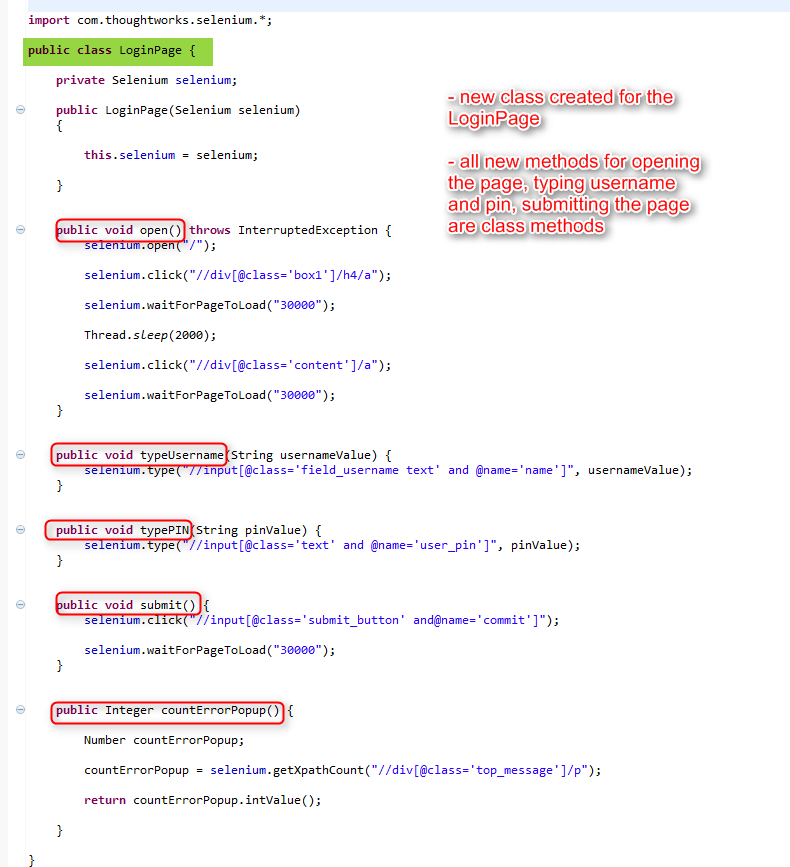
Since openPage(), typeUsername(), typePin(), submit() are all things that the Login page does, it makes sense to create a new class called LoginPage and move all refactored methods to it.

By moving the methods to the LoginPage class, the test methods will no longer include any code that shows how the web page works.

The LoginPage class will need a constructor that gets a Selenium parameter so that its methods can call Selenium methods.


After creating the LoginPage class, change the test methods by 

- creating a LoginPage object in every test method

- prefix all refactored methods with the name of the LoginPage object

Resolve any errors and run the code.


SUMMARY

In this moment, a few things are accomplished:

- Small and independent test methods

- The test methods do not include information about how the site works

- Easy to read and maintain test methods

- I have created a Page Object class for the LoginPage.

All details on how the LoginPage works are in the LoginPage class.

If there are changes in the future for the Login Page, only the Login Page class needs to be modified.


_____________________________________________________________________________


Do you want to learn more about test automation and Java?
I will start an SELENIUM online group training on October 15.
Please see the training details here.

Code refactoring for better test automation code

I took a break from test automation at the beginning of 2012 due to changing jobs.

Recently, I convinced my employer to buy the Ranorex test automation tool (http://www.ranorex.com) after using the tool's trial version to find a bad memory leak in a production application.

So, I resumed working on test automation with Ranorex and C#.

Initially, I created a few scripts through record and play so that I understand the objects used by the application and their attributes.

After the record and play scripts worked well, the real job started.

I cleaned the scripts up by removing duplicated code, making use of looping, variables, classes, using the repository as little as possible.

The scripts started to look better soon but I was still not very pleased with them.

They were clear enough to me but difficult to understand for another person with less Ranorex and application-under-test knowledge.

Some serious changes were needed but I had no clue how to do them.

Then, I found this amazing book at the local library about code re-factoring:
Refactoring: improving the design of written code.

The book presents many ways of improving the design of existing code such as:

- bad smells in code
- composing methods
- moving features between objects
- organizing data
- simplifying conditional expressions
- making method calls simpler
- dealing with generalization

It is written for people that know an object oriented language like C++, C# or Java (all examples are written in Java).

This book helped a lot improving my code by explaining how to

- replace temporary variables with queries
- remove flag control from conditional expressions
- replace nested conditional with guard clauses
- rename methods
- replace error codes with exceptions
- replace a group of parameters with an object
- move features between classes
and many more ....

A benefit of reading the book is that I have learned a few C# features like custom operators, get and set methods, assertions and exceptions.

I am so happy with this book that I am going to buy it to have it handy for future test automation projects.

It is a very good resource for any tester who aims at improving his coding skills for test automation.

Because, as the author of the book puts it, any fool can write code that a computer can understand, Good programmers write code that humans can understand. 

And for this, code re-factoring is essential.