Showing posts with label page object model. Show all posts
Learn Page Objects in 3 Easy Lessons
How does your test automation code look like?
Does it look like this?
driver.get(homePageUrl);
WebElement searchTextBox = browserDriver.findElement(By.id(searchTextBoxId));
searchTextBox.click();
searchTextBox.clear();
searchTextBox.sendKeys(keyword);
WebElement searchTextButton = driver.findElement(By.id(searchTextButtonLocator));
searchTextButton.click();
assertTrue(driver.getTitle().equalsIgnoreCase(expectedResultsPageTitle));
assertTrue(driver.getCurrentUrl().equalsIgnoreCase(expectedResultsPageUrl));
WebElement resultCountLabel = browserDriver.findElement(By.xpath(resultCountLocator);
String resultCountText = resultCountLabel.getText();
int startIndex = resultCountText.substring("of") + 3;
int endIndex = resultCountText.substring(" items");
int resultCount = Integer.parseInt(resultCountText.substring(startIndex, endIndex);
assertTrue(resultCount > 0);
or this?
HomePage homePage = new HomePage(driver);
homePage.openPage();
homePage.searchForKeyword("java");
ResultsPage resultsPage = new ResultsPage(driver);
assertTrue(resultsPage.isOpen() == true);
assertTrue(resultsPage.resultCount() > 0);
If you can write the first version and want to modify it into the second, this step-by-step tutorial is for you.
The tutorial shows you everything you need to know for creating page objects.
The tutorial has 3 parts:
1. how to create page objects
2. how to create page elements
3. how to use page factory
When learning to create page objects, we will go through the following iterations:
1. PREPARE THE TEST CASE FOR AUTOMATION
1.1 group test case actions by page
1.2 break down test case actions in sub-actions
1.3 create methods and variables for each action and sub-action
2. CREATE THE TEST CLASS
2.1 Component of a test class
2.2 How a test script is executed
2.3 Create the template of the test class
2.4 Add code for setUpEnvironment() and cleanUpEnvironment() methods
2.5 Add the code for the test script
2.6 Create objects for the homePage and resultsPage
3. CREATE THE HOME PAGE CLASS
3.1 Create the template of the home page
3.2 Add the fields and methods to the class
3.3 Add values to the fields of the class
3.4 Add the WebDriver field and constructor to the class
3.5 Add the code for the methods
4. CREATE THE RESULTS PAGE CLASS
4.1 Create the template of the results page
4.2 Add the fields and methods to the class
4.3 Add values to the fields of the class
4.4 Add the WebDriver field and constructor to the class
4.5 Add the code for the methods
Want to get started?
Transfer USD 25 through Paypal to alex@alexsiminiuc.com today.
You get the 3-part tutorial and unlimited email support.
How To Write Better Test Automation Code With Test Driven Development
Test automation code can be improved greatly with the Test Driven Development (TDD) principles:
How does test driven development work?
The development process is as follows when TDD principles are applied:
These tasks are also called Red/Green/Refactor:
RED - write a little test that doesn't work, perhaps it doesn't even compile
GREEN - make the test work quickly, committing whatever sins necessary in the process
REFACTOR - eliminate all the duplication created in just getting the test to work
How can TDD be used for test automation projects?
The easiest way of seeing TDD in action is through a short automation project.
The following project uses page objects for automating a test case.
The project will be created so that
The test case to automate is quite simple:
Lets create the test class template first.
The test class has the following components:
Executing the code will return the PASS status (green).
Open The Home Page Of The Site
The test script does not do anything yet.
Lets add some code to it.
Running the test script will return the fail status (red).
The test script fails because the HomePage class does not exist.
To go from red to green, I will create the HomePage class and add minimal code to it so that the test script works:
Next, lets do the refactoring phase:
Running the test script gets us green status again and we see things happening in the browser.
The updated HomePage class has a few differences compared to its previous version:
Do A Keyword Search
Next, lets add the code that does the keyword search.
The search method needs to be added to the HomePage class together with a few other things.
For the search to happen, a few actions are needed:
I will add to the HomePage class 2 members for the locators needed for
The search method will take a parameter for the keyword value:
Running the test script will fail one more time (red).
This time, the failure is caused by the fact that the search method does not return a ResultsPage object.
When using page objects, if the result of a method is that a new page is displayed, the method should return a new page object.
Lets make the change that gets us from red to green:
The change consists in adding the return type of the search method and returning a ResultsPage object.
The driver object is passed to the constructor of the ResultsPage object.
The test script still fails when executed.
We need the ResultsPage class as well:
We are back to green :)
Check That Results Number Is Greater Than 0
The last part of the script is about checking that the number of results is greater than 0.
I will add the assertion in the test script first:
Running this test scripts fails with red status.
Lets go to green fast:
The test script passes now with green status.
Since the getResultsCount() method returns always 10, it needs refactoring:
The test script and the page object classes are final.
Executing the test script gives us the final green status.
- don't write a line of new code unless you first have a failing automated test
- eliminate duplication
How does test driven development work?
The development process is as follows when TDD principles are applied:
- write a test
- make it compile
- make it run
- remove duplication
- continue from 1
These tasks are also called Red/Green/Refactor:
RED - write a little test that doesn't work, perhaps it doesn't even compile
GREEN - make the test work quickly, committing whatever sins necessary in the process
REFACTOR - eliminate all the duplication created in just getting the test to work
How can TDD be used for test automation projects?
The easiest way of seeing TDD in action is through a short automation project.
The following project uses page objects for automating a test case.
The project will be created so that
- page object classes are created
The test case to automate is quite simple:
- open the home page of the Vancouver Public Library site
- do a keyword search
- on the results page, check that the number of results is greater than 0
Create the test class template
Lets create the test class template first.
The test class has the following components:
- empty test script: testBookDetailsDisplayed()
- setUp() method for creating the driver object and starting the browser
- tearDown() method for closing the driver object and closing the browser
import static org.junit.Assert.assertTrue;
import org.junit.After;
import org.junit.Before;
import org.junit.Test;
import org.openqa.selenium.By;
import org.openqa.selenium.WebDriver;
import org.openqa.selenium.WebElement;
import org.openqa.selenium.chrome.ChromeDriver;
public class VplTests {
WebDriver driver;
@Before public void setUp()
{
System.setProperty("webdriver.chrome.driver", "C:\\Selenium\\BrowserDrivers\\chromedriver.exe");
driver = new ChromeDriver();
}
@After
public void tearDown()
{
driver.quit();
}
@Test
public void testBookDetailsDisplayed()
{
}
}
Executing the code will return the PASS status (green).
Practice RED/GREEN/REFACTOR
Open The Home Page Of The Site
The test script does not do anything yet.
Lets add some code to it.
@Test
public void testBookDetailsDisplayed()
{
HomePage homePage = new HomePage(driver);
assertEquals(homePage.getTitle(), "Vancouver Public Library - Home");
}
The new code lines are needed for the following reasons:- create an object (homePage) that corresponds to the HomePage class; the driver object is provided to the HomePage class constructor.
- create an assertion to check if the title of the homePage is correct
Running the test script will return the fail status (red).
The test script fails because the HomePage class does not exist.
To go from red to green, I will create the HomePage class and add minimal code to it so that the test script works:
public class HomePage{
public HomePage(WebDriver driver)
{
}
public String getTitle()
{
return "Vancouver Public Library - Home";
}
}
Running the test script will return the pass status (green).Next, lets do the refactoring phase:
public class HomePage{
WebDriver driver;
String siteUrl = "http://www.vpl.ca";
public HomePage(WebDriver driver)
{
this.driver = driver;
driver.get(siteUrl);
}
public String getTitle()
{
return driver.getTitle();
}
}
Running the test script gets us green status again and we see things happening in the browser.
The updated HomePage class has a few differences compared to its previous version:
- uses a driver member
- stores the driver parameter of the constructor in the driver class member
- opens the browser
- loads the site in the browser in the constructor using driver.get()
- returns the actual title of the page using driver.getTitle()
Do A Keyword Search
Next, lets add the code that does the keyword search.
@Test
public void testBookDetailsDisplayed()
{
HomePage homePage = new HomePage(driver);
assertEquals(homePage.getTitle(), "Vancouver Public Library - HomePage");
ResultsPage resultsPage = homePage.search("java");
assertEquals(resultsPage.getTitle(), "Search | Vancouver Public Library | BiblioCommons");
}
Running the test script fails with a red status.The search method needs to be added to the HomePage class together with a few other things.
For the search to happen, a few actions are needed:
- the user clicks in the search text box field
- the user types the keyword in the search text box
- the user clicks the search button
- the results page is loaded
I will add to the HomePage class 2 members for the locators needed for
- the search text box
- search button fields
public class HomePage{
WebDriver driver;
String siteUrl = "www.vpl.ca";
String searchTextBoxLocator = "//input[@id='globalQuery']";
String searchButtonLocator = "//input[@class='search_button']";
public HomePage(WebDriver driver)
{
this.driver = driver;
driver.get(siteUrl);
}
public String getTitle()
{
return driver.getTitle();
}
}
The search method will take a parameter for the keyword value:
public class HomePage{
WebDriver driver;
String siteUrl = "www.vpl.ca";
String searchTextBoxLocator = "//input[@id='globalQuery']";
String searchButtonLocator = "//input[@class='search_button']";
public HomePage(WebDriver driver)
{
this.driver = driver;
driver.get(siteUrl);
}
public String getTitle()
{
return driver.getTitle();
}
public void search(String keyword)
{
WebElement searchTextBox = driver.findElement(By.xpath(searchTextBoxLocator));
searchTextBox.sendKeys(keyword);
WebElement searchButton = driver.findElement(By.xpath(searchButtonLocator));
searchButton.click();
}
}
Running the test script will fail one more time (red).
This time, the failure is caused by the fact that the search method does not return a ResultsPage object.
When using page objects, if the result of a method is that a new page is displayed, the method should return a new page object.
Lets make the change that gets us from red to green:
public class HomePage{
WebDriver driver;
String siteUrl = "www.vpl.ca";
String searchTextBoxLocator = "//input[@id='globalQuery']";
String searchButtonLocator = "//input[@class='search_button']";
public HomePage(WebDriver driver)
{
this.driver = driver;
driver.get(siteUrl);
}
public String getTitle()
{
return driver.getTitle();
}
public ResultsPage search(String keyword)
{
WebElement searchTextBox = driver.findElement(By.xpath(searchTextBoxLocator));
searchTextBox.sendKeys(keyword);
WebElement searchButton = driver.findElement(By.xpath(searchButtonLocator));
searchButton.click();
return new ResultsPage(driver);
}
The change consists in adding the return type of the search method and returning a ResultsPage object.
The driver object is passed to the constructor of the ResultsPage object.
The test script still fails when executed.
We need the ResultsPage class as well:
public class ResultsPage
{
WebDriver driver;
public ResultsPage(WebDriver driver)
{
this.driver = driver;
}
public String getTitle()
{
return driver.getTitle();
}
}
}
We are back to green :)
Check That Results Number Is Greater Than 0
The last part of the script is about checking that the number of results is greater than 0.
I will add the assertion in the test script first:
@Test
public void testBookDetailsDisplayed()
{
HomePage homePage = new HomePage(driver);
assertEquals(homePage.getTitle(), "Vancouver Public Library - HomePage");
ResultsPage resultsPage = homePage.search("java");
assertEquals(resultsPage.getTitle(), "Search | Vancouver Public Library | BiblioCommons");
assertTrue(resultsPage.getResultsCount() > 0);
}
Running this test scripts fails with red status.
Lets go to green fast:
public class ResultsPage
{
WebDriver driver;
public ResultsPage(WebDriver driver)
{
this.driver = driver;
}
public String getTitle()
{
return driver.getTitle();
}
public int getResultsCount()
{
return 10;
}
}
The test script passes now with green status.
Since the getResultsCount() method returns always 10, it needs refactoring:
public class ResultsPage
{
WebDriver driver;
String resultLinkLocator = "//a[@testid='bib_link']";
public ResultsPage(WebDriver driver)
{
this.driver = driver;
}
public String getTitle()
{
return driver.getTitle();
}
public int getResultsCount()
{
List resultsList = driver.findElements(By.xpath(resultLinkLocator));
return resultsList.size();
}
}
The test script and the page object classes are final.
Executing the test script gives us the final green status.
How To Create The Selenium Driver Object In The Test Automation Framework
Good test automation practices say that no WebDriver API should be used in test scripts.
The browser driver object should also not be created and closed in the test class but in the automation framework.
Having the browser driver object created in the setUp() method of each test class is redundant and error prone.
Dont create and close the driver object in the test class
Lets start with a simple test case for the Vancouver Public Library site:
The test class is very straightforward:
The typical test automation architecture uses the following layers:
In this architecture, each layer communicates only with the next layer so
Our test script looks pretty good from the test automation architecture point of view:
The HomePage, ResultsPage and DetailsPage classes do not include WebDriver API either.
This is because all page object classes inherit from the Base Class.
All basic interactions with the site are implemented in the Base Class:
See the complete code below:
The test class looks good with one exception:
creating and closing the driver object
We should create and close the driver object outside of the test class as well.
Create/close the driver in the page object classes
One option is to move the code that creates/closes the driver object from the test class to the page object classes.
This solves the problem of having the test scripts 100% free of WebDriver API but creates another issue.
Each page object class will have code for creating and closing the driver.
Having duplicated code for managing the driver is not a good idea.
Create/close the driver in base class constructor
Since the page object classes are using the base class for all site interactions, how about we move the driver code to the base class as well?
The first place where driver object code can go is in the the base class constructor.
The driver object is declared first as a member of the base class:
This does not work unfortunately because the driver will be instantiated for each page object.
See what happens in our code:
What other options do we have?
Create a static driver member of the base class and instantiate it in a static block
First, we need the ability of creating the driver object once only and re-use it for all page objects.
The driver object should also be closed once at the end of the script.
The "create once only" reminds us of static class members:
But if the driver could be created before the base class constructor, then we are onto something.
So static blocks enter the scene.
The code from a static block is executed once only for the base class.
What is even better is that the static block code executes before the constructor:
}
The test class looks a bit different with the new changes:
Because the driver object is static and is initialized in the static block, it is created once for the Base class (for the HomePage object).
The ResultsPage and DetailsPage objects will use the same static object without initializing it again.
The constructors of the HomePage, ResultsPage and DetailsPages do not need the WebDriver parameter.
In the test class, there is no WebDriver member any longer.
The setUp() method is empty.
The tearDown() method uses a static method of the BasePage class that just closes the static driver.
The browser driver object should also not be created and closed in the test class but in the automation framework.
Having the browser driver object created in the setUp() method of each test class is redundant and error prone.
Dont create and close the driver object in the test class
Lets start with a simple test case for the Vancouver Public Library site:
- Open the home page of the site
- Execute a keyword search
- On the results page, click the title of the first result
- On the details page, check that the book title is correct (displayed and including more than 1 character)
import static org.junit.Assert.*; import org.junit.After; import org.junit.Before; import org.junit.Test; import org.openqa.selenium.WebDriver; import org.openqa.selenium.chrome.ChromeDriver;
public class TestCreateDriverInBaseClass {
String keyword = "java"; WebDriver driver;
@Before
public void setUp() { driver = new ChromeDriver();}
@After
public void tearDown() { driver.quit();}
@Test
public void testFirstResult() throws Exception
{
HomePage home = new HomePage(driver);
ResultsPage results = home.search(keyword);
DetailsPage details = results.selectResult(1);
assertTrue(details.correctBookTitle() == true); } } The test class is very straightforward:
- uses 2 fields, one for the search keyword, the second for the driver object
- setUp() method for creating the driver object and opening the browser
- tearDown() method for closing the driver object and closing the browser
- one test script, testFirstResult(), that implements the test case
The typical test automation architecture uses the following layers:
In this architecture, each layer communicates only with the next layer so
- test scripts communicate only with the framework classes; test scripts do not communicate directly with the WebDriver API
- framework classes communicate with the WebDriver API; the framework classes are created using the page object model
- WebDriver API communicates with the browser
Our test script looks pretty good from the test automation architecture point of view:
- it uses the HomePage class for creating the home object
- the search() method of the HomePage class implements the keyword search; since the result of a keyword search is opening the results page, the search method returns an object of the ResultsPage class (it returns a page object)
- the selectResult() method of the ResultsPage class selects a result; since the outcome of clicking a result is going to the details page, the selectResult() method returns an object of the DetailsPage class
- the correctBookTitle() method of the DetailsPage class is used for checking if the book title is displayed and it has more than 0 characters
- the assertion checks if the book title is correct
The HomePage, ResultsPage and DetailsPage classes do not include WebDriver API either.
This is because all page object classes inherit from the Base Class.
All basic interactions with the site are implemented in the Base Class:
- open a page
- get a page title
- find an element using explicit wait
- get the value of an element
- check if an element is displayed
See the complete code below:
package CreateDriver;
import org.junit.Rule; import org.openqa.selenium.By; import org.openqa.selenium.WebDriver; import org.openqa.selenium.WebElement; import org.openqa.selenium.chrome.ChromeDriver; import org.openqa.selenium.support.ui.ExpectedConditions; import org.openqa.selenium.support.ui.WebDriverWait;
public class BasePage {
WebDriverWait wait; WebDriver driver;
public BasePage(WebDriver driver) { this.driver = driver; wait = new WebDriverWait(driver, 10); }
public WebElement find(String locator) { return wait.until(ExpectedConditions.visibilityOfElementLocated(By.xpath(locator))); }
public void clickElement(String locator) { find(locator).click();}
public String getPageTitle() { return driver.getTitle();}
public void open(String url) { driver.get(url);}
public void typeText(String locator, String keyword) { find(locator).sendKeys(keyword); }
public String getValue(String locator) { return find(locator).getText();}
public Boolean isDisplayed(String locator) { return find(locator).isDisplayed(); }
}
public class HomePage extends BasePage {
String searchFieldLocator = "//input[@id='globalQuery']"; String searchButtonLocator = "//input[@class='search_button']";
String siteUrl = "http://www.vpl.ca";
public HomePage(WebDriver driver) throws Exception {
super(driver);
open(siteUrl);
if (getPageTitle().equalsIgnoreCase("Vancouver Public Library - Home") == false) throw new Exception("this is not the home page");
}
public ResultsPage search(String keyword) throws Exception {
typeText(searchFieldLocator, keyword); clickElement(searchButtonLocator);
return new ResultsPage(driver);
}
}
public class ResultsPage extends BasePage{
String resultLinkLocator = "(//a[@testid='bib_link'])"; public ResultsPage(WebDriver driver) throws Exception {
super(driver);
if (getPageTitle().equalsIgnoreCase("Search | Vancouver Public Library | BiblioCommons") == false) throw new Exception("this is not the results page");
}
public DetailsPage selectResult(int i) throws Exception {
resultLinkLocator = resultLinkLocator + "[" + i + "]";
clickElement(resultLinkLocator);
return new DetailsPage(driver);
}
}
public class DetailsPage extends BasePage{
String bookTitleElementLocator = "//h1[@id='item_bib_title']"; String bookAuthorElementLocator = "//a[@testid='author_search']";
public DetailsPage(WebDriver driver) throws Exception {
super(driver);
if (getPageTitle().indexOf("Vancouver Public Library | BiblioCommons") < 0) throw new Exception("this is not the details page");
}
public Boolean correctBookTitle() {
return getValue(bookTitleElementLocator).length() > 0 &&
isDisplayed(bookTitleElementLocator);
} } The test class looks good with one exception:
creating and closing the driver object
We should create and close the driver object outside of the test class as well.
Create/close the driver in the page object classes
One option is to move the code that creates/closes the driver object from the test class to the page object classes.
This solves the problem of having the test scripts 100% free of WebDriver API but creates another issue.
Each page object class will have code for creating and closing the driver.
Having duplicated code for managing the driver is not a good idea.
Create/close the driver in base class constructor
Since the page object classes are using the base class for all site interactions, how about we move the driver code to the base class as well?
The first place where driver object code can go is in the the base class constructor.
The driver object is declared first as a member of the base class:
WebDriverWait wait;
WebDriver driver;
public BasePage() {
driver = new ChromeDriver();
wait = new WebDriverWait(driver, 10);
} This does not work unfortunately because the driver will be instantiated for each page object.
See what happens in our code:
- a driver object is created for the HomePage object; the browser is opened and the site is loaded in it
- when the ResultsPage object is created, another driver object is created; another browser instance is loaded but with no site in it; the site is still loaded on the first browser instance
What other options do we have?
Create a static driver member of the base class and instantiate it in a static block
First, we need the ability of creating the driver object once only and re-use it for all page objects.
The driver object should also be closed once at the end of the script.
The "create once only" reminds us of static class members:
protected static WebDriverWait wait;
protected static WebDriver driver;
If the driver is, however, still created in the base class constructor, things will not be very different.
But if the driver could be created before the base class constructor, then we are onto something.
So static blocks enter the scene.
The code from a static block is executed once only for the base class.
What is even better is that the static block code executes before the constructor:
package CreateDriver;
import org.junit.Rule; import org.openqa.selenium.By; import org.openqa.selenium.WebDriver; import org.openqa.selenium.WebElement; import org.openqa.selenium.chrome.ChromeDriver; import org.openqa.selenium.support.ui.ExpectedConditions; import org.openqa.selenium.support.ui.WebDriverWait;
public class BasePage {
protected static WebDriverWait wait;
protected static WebDriver driver;
static {
driver = new ChromeDriver(); wait = new WebDriverWait(driver, 10);
}
public static void closeBrowser() { driver.quit(); }
public WebElement find(String locator) {
return wait.until(ExpectedConditions.visibilityOfElementLocated(By.xpath(locator)));
}
public void clickElement(String locator) {find(locator).click();}
public String getPageTitle() {return driver.getTitle();}
public void open(String url) { driver.get(url);}
public void typeText(String locator, String keyword) { find(locator).sendKeys(keyword); }
public String getValue(String locator) { return find(locator).getText();}
public Boolean isDisplayed(String locator) { return find(locator).isDisplayed(); }
} The test class looks a bit different with the new changes:
import CreateDriver.*; import static org.junit.Assert.*; import org.junit.After; import org.junit.Before; import org.junit.Test;
public class TestCreateDriverInBaseClass {
String keyword = "java";
@Test
public void testFirstResult() throws Exception {
HomePage home = new HomePage();
ResultsPage results = home.search(keyword);
DetailsPage details = results.selectResult(1);
assertTrue(details.correctBookTitle() == true);
}
@Before
public void setUp() { }
@After
public void tearDown() { BasePage.closeBrowser();
}
} Because the driver object is static and is initialized in the static block, it is created once for the Base class (for the HomePage object).
The ResultsPage and DetailsPage objects will use the same static object without initializing it again.
The constructors of the HomePage, ResultsPage and DetailsPages do not need the WebDriver parameter.
In the test class, there is no WebDriver member any longer.
The setUp() method is empty.
The tearDown() method uses a static method of the BasePage class that just closes the static driver.
Page Object Methods Should Return Objects
22:13
Posted by Alex Siminiuc
Learning the page object model is a very important skill for test automation with Selenium.
When learning test automation with Selenium, the Page Object Model is useful for creating classes that correspond to site pages (or components of pages) so that the WebDriver APIs are moved from the test scripts to the page object classes.
After you create page object classes, make sure that each page object method returns either
- A PAGE OBJECT: if the method generates a page change or a new page (example: changing the sort order for a web page will reload the page)
or
- THIS KEYWORD: if the method's action does not change anything in the page (example: typing a keyword into a textbox does not change anything else in the page)
To see the benefits of returning objects from page object methods, lets look at a simple test case with the following steps:
1. open the home page of a web site
2. do a keyword search
3. after the results page is loaded, change the sort order
4. after the results page reloads as a result of changing the sort order, select a different results page (page number 5)
5. after the 5th results page is loaded, change the number of results displayed in the page
6. after the page reloads, select one of the results
7. after the result's details page is loaded, confirm that the result's price is valid
The test script for the test case needs 3 page object classes:
None of the page object methods returns an object.
The test script looks as follows:
The problems of the test script are evident:
Multiple improvements result from the new page object classes:
When learning test automation with Selenium, the Page Object Model is useful for creating classes that correspond to site pages (or components of pages) so that the WebDriver APIs are moved from the test scripts to the page object classes.
After you create page object classes, make sure that each page object method returns either
- A PAGE OBJECT: if the method generates a page change or a new page (example: changing the sort order for a web page will reload the page)
or
- THIS KEYWORD: if the method's action does not change anything in the page (example: typing a keyword into a textbox does not change anything else in the page)
To see the benefits of returning objects from page object methods, lets look at a simple test case with the following steps:
1. open the home page of a web site
2. do a keyword search
3. after the results page is loaded, change the sort order
4. after the results page reloads as a result of changing the sort order, select a different results page (page number 5)
5. after the 5th results page is loaded, change the number of results displayed in the page
6. after the page reloads, select one of the results
7. after the result's details page is loaded, confirm that the result's price is valid
The test script for the test case needs 3 page object classes:
public class HomePage
{
public void search()
}
public class ResultsPage
{
public void changeSortOrder(String sortOrder)
public void changeResultsPerPage(int number)
public void changePage(int pageNumber)
public void selectResult(int index)
}
public class DetailsPage
{
public Boolean validPrice()
}
None of the page object methods returns an object.
The test script looks as follows:
@Test
public void testValidPrice()
{
HomePage homePage = new HomePage();
homePage.search();
ResultsPage resultsPage = new ResultsPage();
resultsPage.changeSortOrder("author");
resultsPage.changePage(5);
resultsPage.changeResultsPerPage(25);
resultsPage.selectResult(3);
DetailsPage detailsPage = new DetailsPage();
assertTrue(detailsPage.validPrice(), true);
}
The problems of the test script are evident:
- too many new objects are being created (homePage, resultsPage, detailsPage)
- each action is separate
- the flow of the test script does not follow user actions: when the user changes the sort order on the ResultsPage, a new ResultsPage is created as a result
Lets change the page object classes so that all page object methods return objects:
public class HomePage
{
public ResultsPage search();
}
public class ResultsPage
{
public ResultsPage changeSortOrder(String sortOrder)
public ResultsPage changeResultsPerPage(int number)
public ResultsPage changePage(int pageNumber)
public DetailsPage selectResult(int index)
}
public class DetailsPage
{
public Boolean validPrice()
}
@Test
public void testValidPrice()
{
DetailsPage detailsPage = (new HomePage()).search().changeSortOrder("author").changePage(5).changeResultsPerPage(25).selectResult(3);
assertTrue(detailsPage.validPrice(), true);
}
Multiple improvements result from the new page object classes:
- multiple methods can be chained
- the test script is much more compact
- less objects are created
Code Refactoring And Page Object Model
13:36
Posted by Alex Siminiuc
Video
On this post, I will look at ways of improving Selenium scripts through code refactoring and starting to build a page object model.
DEFINE TEST CASE
I will use again the site of the Vancouver Public Library (http://www.vpl.ca).
The test cases to be automated are related to the login page:
SETUP
- open the www.vpl.ca site
- click on the MY VPL link
- wait until the next page loads
- click the LOGIN TO MY VPL page
- wait until the next page loads
VERIFY
- login does not work when using an invalid username and invalid pin
- login does not work when using an invalid username and correct pin
- login does not work when using an correct username and invalid pin
- login does not work when using no username and no pin
- login works with correct username and correct pin
GETTING READY
The first thing to do is to inspect all HTML elements needed in the script in FIREBUG and identify XPATH expressions for finding them:
MY VPL link
//div[@class='box1']/h4/a
LOGIN TO MY VPL button
//div[@class='content']/a
USERNAME field
//input[@class='field_username text' and @name='name']
PIN field
//input[@class='text' and @name='user_pin']
LOGIN button
//input[@class='submit_button' and@name='commit']
ERROR POPUP
//div[@class='top_message']/p
As soon as the XPATH expressions are created, I will
- start the Selenium server
- create a new Java project in Eclipse
- add the Selenium Server and Client JARs to the project
- create a new test class
- import the Selenium package to the class
- add the setUp and tearDown methods to the test class for starting and stopping the Selenium server; these methods use the @Before and @After annotations
- create an empty test method
- run the project
- if everything done before is correct, the project should run successfully
It is the time now for adding the code to the test method for the test case:
- the open, click, waitForPageLoad, selenium commands are used for navigating to the Login page
- the type and click selenium commands are used for entering the username and pin values on the Login page
- the click selenium commands is used for submitting the login page
- the getXpathCount selenium command is used for checking if the login failed or succeeded
Run the project again and confirm that there are no errors.
The next step is to copy some of the code for all 5 login page verifications.
The code is identical for the verifications with the exception of the values of the username and pin.
Since some of the verifications need a correct username and pin, I import a new class that provides the correct username and pin values read from an xml file.
Running the project again should not return errors.
CODE REFACTORING
The following changes will be done to the code for refactoring:
1. split the test methods in 5 smaller test methods; each verification from the test case is done in a separate test method
2. since each test method takes 14 seconds to run, use @BeforeClass and @AfterClass instead of @Before and @After so that the selenium server is started once before all test methods run and stopped once after all test methods are executed; the test execution time for the methods should go down to 6 seconds because of these changes
3. create a new method for the code that opens the Login page: openPage()
4. create a new method for the code that types the username value:
typeUsername(String usernameValue)
add a parameter to the method for the username value
5. create a new method for the code that types the pin value: typePin(String pinValue)
add a parameter to the method for the pin value
6. create a new method for the code that submits the login page: submit()
7. create a new method for the code that checks if the login was successful or not: countErrorPopups()
8. replace the code from each test method with the new refactored methods; add the values to the parameter of each method
9. Resolve any errors and run the project
PAGE OBJECT MODEL
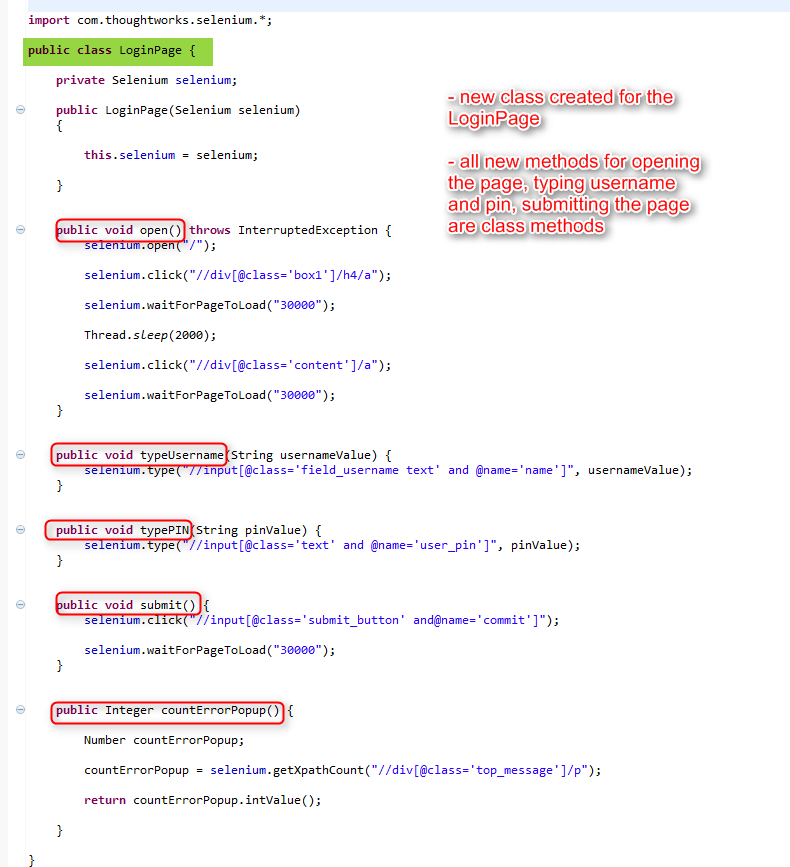
Since openPage(), typeUsername(), typePin(), submit() are all things that the Login page does, it makes sense to create a new class called LoginPage and move all refactored methods to it.
By moving the methods to the LoginPage class, the test methods will no longer include any code that shows how the web page works.
The LoginPage class will need a constructor that gets a Selenium parameter so that its methods can call Selenium methods.
After creating the LoginPage class, change the test methods by
- creating a LoginPage object in every test method
- prefix all refactored methods with the name of the LoginPage object
Resolve any errors and run the code.
SUMMARY
In this moment, a few things are accomplished:
- Small and independent test methods
- The test methods do not include information about how the site works
- Easy to read and maintain test methods
- I have created a Page Object class for the LoginPage.
All details on how the LoginPage works are in the LoginPage class.
If there are changes in the future for the Login Page, only the Login Page class needs to be modified.
_____________________________________________________________________________
Do you want to learn more about test automation and Java?
I will start an SELENIUM online group training on October 15.
Please see the training details here.
Subscribe to:
Posts (Atom)